
The safest way to move electronics is upright, padded on every side and boxed so nothing can shift. Most screen damage comes from movement inside a loose carton or a heavy box stacked on top, not from the drive. Since 1996, our crews at Affordable Quality Moving and Storage have packed homes and offices in Santa Clarita, CA.
Our professional movers train through the American Moving and Storage Association’s Certified Packer Loaders Program. They also protect the floors and walls at both homes while the gear goes out the door. The steps below split the work between what you handle yourself and what to leave to our crew.
What Should You Do Before the Crew Arrives?
Most of the work that protects electronics happens before a single box is taped. Data, cables and small parts are the things a crew cannot manage for you, so they belong on your list rather than ours. A crew that arrives in unplugged, labeled gear can start wrapping right away.
- Back up your data. Copy computers, phones and external drives to a cloud account or a separate drive that travels with you.
- Photograph every connection. A picture of the back of the TV, the router and the gaming setup turns reconnecting into a ten minute job.
- Bag and label the cables. One zip top bag per device, labeled by room, keeps HDMI cords and power bricks from mixing.
- Remove discs, ink and batteries. Discs rattle loose, printer cartridges leak and old batteries can corrode inside remotes.
- Find the original boxes. Manufacturer packaging with its foam inserts is still the best container for most devices.
Once those steps are done, the wrapping and boxing can go to our packing and unpacking service. Packing goes faster when the devices are already unplugged and the cables are sorted, and the wrapping stays consistent from room to room.
How Do Packers Protect a Flat Screen TV?
A flat screen is thin glass in a frame that flexes, which is why it has to ride upright. Laid flat, the weight of the panel presses on its own center, and every bump on the freeway adds to that pressure. Standing upright, the frame carries the load the way it was built to.
Safely moving large and fragile items comes down to the same three things every time. A soft layer goes over the screen that will not scratch it, the corners get extra padding, and the TV goes into its original carton or a box sized to the screen.
Tape never touches the screen itself. Bracket screws from a wall mount go in a bag taped to the box. That way the new installation does not start with a hardware store run.
Our crew can wrap every TV in the house for you. Ask for electronics packing when you book your free in home estimate. We will note each screen, computer and console so the crew arrives with the right boxes.
Looking at a wall mounted TV and a desk full of monitors and wondering where to even start? Give us a call at (661) 384-6881, and we will count the screens and bring the right boxes to your Santa Clarita home.
How Should Computers and Home Office Equipment Travel?
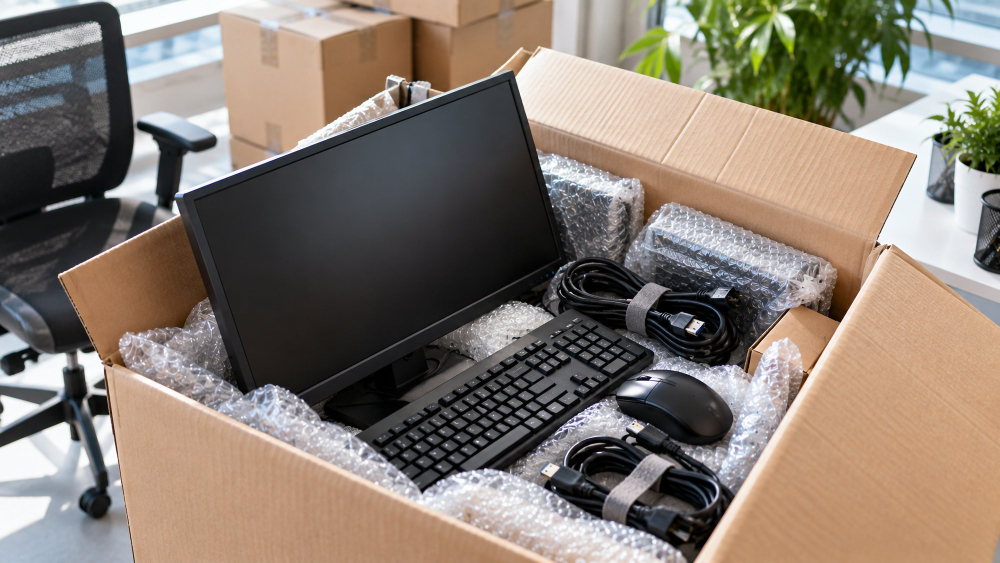
Desktop towers, monitors and printers are sturdier than TVs but more sensitive to shock and static. Pack towers upright with padding on every side, and wrap monitors the way you would a small TV. Loose components and drives go in antistatic bags.
Home offices in the SCV have grown into full workspaces for many households, with docking stations, extra monitors and networking gear. Those setups take the longest to rebuild. Label each cable bag by device and pack the office last. It comes off the truck early, and you can work the next morning.
Businesses face the same problem at a larger scale. Our commercial crews move computers, phone systems and office electronics for companies relocating across the Santa Clarita Valley. That work follows the same wrap, label and load order as a home office, just with more desks.
Which Electronics Should Ride With You Instead of on the Truck?
Some devices are small enough, valuable enough or personal enough that your car is the better choice. Anything holding work files or family photos belongs in that group, even when it would fit on the truck. The table sorts the common ones.
| Device | Best way to move it | Why |
|---|---|---|
| Laptops, tablets, phones | In your car | Personal data and daily use |
| Backup drives | In your car, apart from the computer | One copy stays safe if the other is lost |
| Flat screen TVs | On the truck, upright in a TV box | Needs padding and a fixed position |
| Desktop towers, monitors | On the truck, boxed and padded | Heavy and bulky for a car |
| Cameras, handheld consoles | In your car | Small, costly and easy to misplace |
Pack the car items last so they are the easiest things to grab on the way out. Set them in one spot, like an empty bathtub or a closed closet, where nobody on the crew will mistake them for truck cargo.
Why Does Santa Clarita Heat Matter for Electronics?
Summer afternoons in the Santa Clarita Valley run hot. A closed truck, a car trunk or an unventilated garage gets hotter than the air outside. Heat can damage batteries and warp plastic housings, and carrying a cold device into a warm room can put condensation on its circuits.
Load electronics during the cooler morning hours when you can. Never leave a laptop or camera in a parked car during a long lunch stop. After delivery, give any device that traveled through heat an hour or two at room temperature before you plug it in. The same patience applies to the heavier pieces, and our guide to moving large or fragile items covers crating and loading for those.
What Should You Do If Something Stops Working After the Move?
Set up and test every device within a day or two of delivery, while the paperwork is easy to find. Start with the TV and the router. Those two tell you quickly whether a cable went into the wrong port or something inside was damaged. A device that powers on but shows a cracked or dark panel should be photographed before you touch it again. Keep the boxes for a week as well, since the packaging helps show how an item traveled.
If something was damaged, document it in writing with photos and contact your mover promptly. What you can recover depends on the valuation coverage you chose. The basic coverage many movers include pays far less than the replacement cost of a modern television. Check the moving insurance coverage types before moving day so your protection matches what your electronics are worth.
Where Do You Book Electronics Packing in Santa Clarita?
Customers in Santa Clarita, CA can request a free in home estimate from our website. Pick a time that works, including after hours or on a weekend. Our estimator walks every room and counts the screens and computers. You get a price with no hidden fees before anything is scheduled.
Casey and Kelly Kirkman have owned our company since 2006. Our crews give a single gaming console the same care as an office phone system. Tell us what you are moving and when, and we will plan the electronics around the rest of the house.
Frequently Asked Questions
Do I need the original boxes for my TV and computers?
They help, but you don’t need them. If the manufacturer boxes are long gone, our crew brings cartons sized to each screen and device, along with padding for the corners and screens. Let us know what you have during your in home estimate, and the crew will arrive with the right boxes for everything else.
How much does electronics packing cost?
It depends on how many screens, computers and other devices need packing, and how much of the rest of the house we’re packing too. During your free in home estimate, our estimator counts every piece of electronics room by room. You’ll get a price with no hidden fees before anything is scheduled.
What if something gets damaged during the move?
What you can recover depends on the valuation coverage you choose. Basic coverage often pays far less than the cost of replacing a modern TV or computer, so it’s worth choosing protection that matches what your electronics are worth before moving day. If you do notice damage, photograph it, note it in writing and contact us promptly.
What happens after I book?
Our estimator walks your home, counts the screens and computers, and gives you a price. On moving day, the crew arrives with the right boxes, protects your floors and walls, and packs each device so it can’t shift in transit. Your home office comes off the truck early, so you can be back to work the next morning.
Careful packing, upright loading and a crew trained to handle screens and computers mean your devices arrive ready to plug in. Affordable Quality Moving and Storage has been moving Santa Clarita homes and offices since 1996. Give us a call at (661) 384-6881, and we’ll plan your electronics around the rest of your move.
Related Topics:
- Family Moving Checklist: Santa Clarita
- Last Minute Moves in Santa Clarita